
Jan 05, 2026
206


Registering on the PRAZ e-GP platform is one thing. And knowing how to search for the right tender opportunities is another.
Think of it this way. You can register your business, get the right supplier categories and have all your paperwork in order. But if you don't know how to find tenders that match your business, how will you get the opportunity to bid?
This is where many businesses miss the point.
Effective tender searching is an underrated skill. You cannot apply for a tender you haven't found. And you cannot find the right opportunities if you don't know how to search.
In this guide, we'll show you how to search for tenders on the PRAZ e-GP platform, understand the available search filters and use different search methods to find opportunities that are relevant to your business.
How to Search For Tenders on PRAZ e-GP
Why Effective PRAZ Tender Search Is a Key Skill
Before You Start Searching for Tenders
Understanding Tender Search Filters
What to Do If You Cannot Find a Tender
There is something that most people don't appreciate about tendering.
Finding the right tender opportunities is just as important as having your PRAZ registration in place.
Think about how big the government is. Every day, hundreds of procurement opportunities come up. From construction, ICT, cleaning and printing to stationery, catering, transport and many other services. I mean, literally everything you can think of.
Now, imagine trying to search through all these opportunities without a clear strategy. You could spend hours looking at tenders that have nothing to do with your business.
That's why you need to know how to identify opportunities that match what your business offers.
And that's where effective tender searching comes in.
This skill doesn't just help you find tenders. It helps you find the right tenders for your business.
The better you become at searching, the easier it becomes to identify relevant opportunities and spend your time preparing bids that make business sense.
So, before we look at the different search methods, let's first talk about what you need to know before you start searching.
Soon after registering on the PRAZ e-GP platform, you might be tempted to jump straight into searching for tenders.
My recommendation? Hold on a little bit.
Before you start searching, take a few minutes to identify two things.
You need to be clear about the goods or services your business can supply. What exactly do you want to sell to the government? What services can you provide? What types of projects can your business handle?
This is where you need to think a little deeper.
Let's say you operate a construction company. You shouldn't limit your search to the word construction. Buyers might advertise opportunities under terms such as building works, construction materials, road construction, renovations or civil engineering projects.
If you only search for one keyword, you could miss opportunities advertised using a different term.
That's why this preparation is so important. It makes your search more focused and helps you avoid wasting time reviewing tenders that have nothing to do with your business.
Once you've identified the types of contracts you can fulfil and the keywords buyers might use, you're ready to start searching.
But first, let's understand the different search filters available on the PRAZ e-GP platform

Now that you know what your business can offer and which keywords to search for, let's look at the search filters available to help you find tenders.
When you open the tender search page on the PRAZ e-GP platform, you'll see several search fields and filters. Each one helps you find opportunities in a different way.
You don't have to use all of them every time you search. The trick is knowing which ones to use depending on what you're looking for.
Let's go through them.
Every tender listed on the platform has a Tender ID. This is a unique number assigned to that tender on e-GP.
It is particularly useful when someone has shared a specific tender with you.
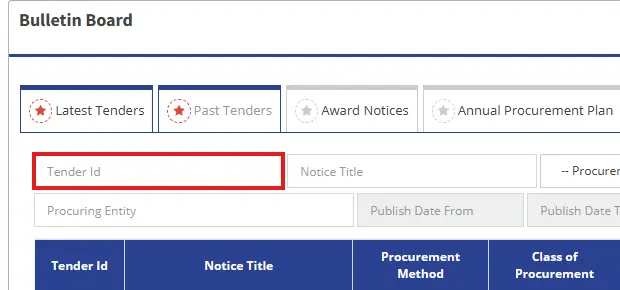
The Tender Reference Number is another way to identify a specific procurement opportunity. It is the unique number assigned by the procuring entity.
For example, you might come across a reference number in a tender notice shared by Tendertube or published on another website.
If you have that reference number, enter it in the search field to locate the corresponding tender on e-GP.
If you are totally new to eGp platform and you have no idea where to start, this is one of the most useful filters when you're looking for opportunities.
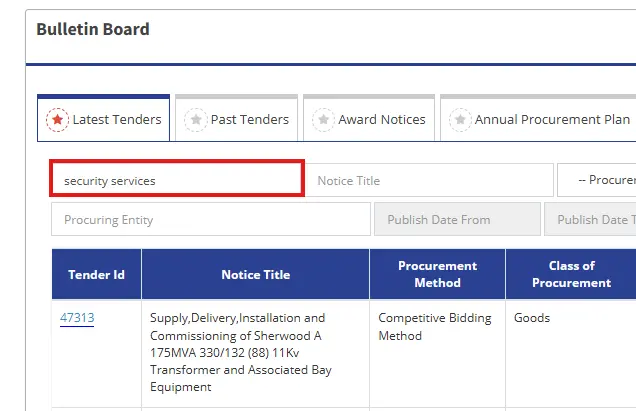
The Tender Title field allows you to search using words related to the goods, works or services being procured.
Let's say you supply stationery. You could start by searching for stationery.
You could then try other terms, such as office supplies or printing paper, to discover opportunities that might not appear under your first search.
Remember, buyers don't always describe the same type of requirement using the same words. That's why you should experiment with different keywords.
This filter helps you find tenders associated with a particular supplier category code.
Since you've already registered with PRAZ, I assume you know your categories.
Use this filter to look for tenders that require the relevant category. It can help you narrow down the results instead of relying entirely on keywords.
Not everyone remembers their supplier category codes. Fortunately, the search page also provides a category name filter.
This allows you to search using the name of the required supplier category rather than the code.
For example, a business looking for opportunities involving building or civil engineering works can explore the relevant categories displayed in the filter.
The important thing is to select a category that relates to the work your business can actually deliver.
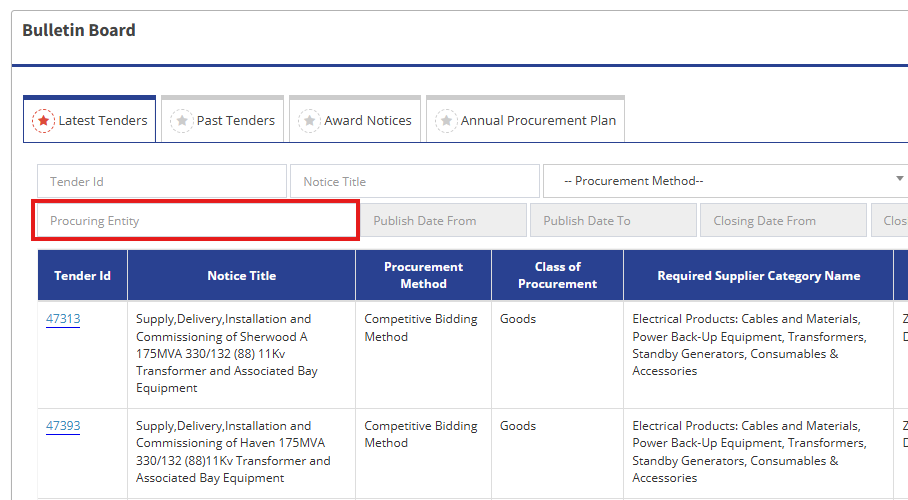
A procuring entity is the organisation inviting suppliers to submit bids.
It could be a government ministry, local authority, public institution or another organisation conducting public procurement.
Let's say you want to supply goods to a particular local authority. Instead of searching through every tender published on the platform, you can select that organisation in the Procuring Entity filter.
This is particularly useful if you already know which organisations are likely to need your products or services.
These fields help you filter tenders according to when they were published.
The Publish Date From field specifies the beginning of your search period, while Publish Date To specifies the end.
For example, if you want to review tenders published within a particular week, enter the start and end dates for that period.
This is useful when you want to discover recently published opportunities or review tenders from a specific period.
These fields help you search for tenders according to their closing dates.
Suppose you want to identify opportunities closing within the next few weeks. You can use the closing date range to narrow your results.
This can help you plan your time and prioritise opportunities with deadlines that give you enough time to prepare a bid.
Now that you understand the different filters, you might be wondering whether you need to fill in every field whenever you search.
Not at all.
If you're exploring available opportunities for the first time and you don't have a specific tender in mind, start with a broad search.
The idea is to cast your net wider before deciding which opportunities deserve closer attention.
A broad search is where you start with general keywords to discover tender opportunities.
For example, let's say your business supplies stationery.
You could start by entering stationery in the Tender Title field and searching.
The results might include different opportunities related to stationery supplies. You can then review the titles to identify tenders that are relevant to your business.
But don't stop there.
Try other related keywords, such as:
Why do this? Because different procuring entities may describe similar requirements differently.
Let's say you've searched for stationery and received several results. Some are relevant to your business, while others aren't.
What do you do?
You narrow your search.
A narrow search means using more specific keywords or additional filters to reduce the number of results and focus on opportunities that better match your business.
The goal is to spend less time reviewing unsuitable tenders and more time assessing opportunities worth pursuing.
For example, instead of searching for stationery, you could search for supply and delivery of office stationery.
You could also combine your keyword with other filters such as a supplier category, a procuring entity or a date range, where the platform allows it.
Let's say you supply cleaning products and want to find relevant tenders published by a POTRAZ within a specific period. Instead of relying on a single keyword, you could combine filters keyword, procuring entity and a date range. The platform then uses the criteria you've entered to return matching results.
So what are we saying here? When you have a clearer idea of the opportunities you're looking for, when you want to target specific procuring entities or periods, or when you need to locate a particular tender, use advanced search.
One thing to remember is that using more filters doesn't automatically mean you'll find better opportunities. If your criteria are too restrictive, you might exclude tenders that would otherwise be relevant.
Sometimes you'll search for a tender and get no results. Other times, you'll get results, but none of them will be relevant to your business.
Don't be too quick to assume that the opportunity isn't there. Sometimes, the problem is how you're searching.
Here are a few things you can try.
Remember what we discussed earlier about how buyers describe their requirements?
A procuring entity looking for stationery might not use the word stationery in the tender title. It might advertise for office supplies, printing paper or the supply and delivery of consumables.
So, if your first search doesn't return useful results, try alternative keywords that describe the same product or service.
Think about the different ways a buyer might describe what you're selling.
Sometimes, you may have applied too many filters without realising it.
For example, you might have selected a particular supplier category, procuring entity and publication date range. If the tender doesn't match even one of those criteria, it may not appear in your results.
Try removing one or two filters and searching again.
If you suddenly get more results, review them to see whether any relevant opportunities were excluded by your original search criteria.
Make sure the tender is still open and active on the platform. Tenders may not appear in active search results due to several administrative status changes:
If you have tried multiple keyword combinations, adjusted your filters, checked for cancellations, and still cannot find the tender, reach out directly to the issuing authority:
Registering on the PRAZ e-GP platform is a good start. But registration alone won't bring tender opportunities to your business.
You need to know how to find them.
Start by understanding what your business can offer. Identify the keywords buyers might use, learn how to use the search filters and practise the different search methods we've discussed.
And don't give up just because your first search doesn't produce the results you want. Try different keywords, adjust your filters and keep checking for new opportunities.
Remember, the goal isn't to find every tender published on the platform. It's to find the opportunities that make sense for your business.